

SYNOPSIS
#include <agar/core.h>
#include <agar/gui.h>
DESCRIPTION
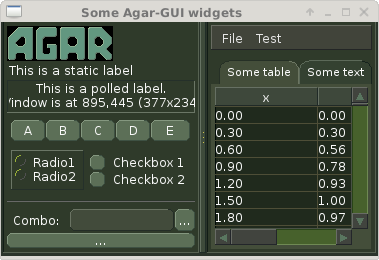 The graphical appearance of Agar widgets (including typography, colors,
paddings, spacings and decorations) is determined by the stylesheet of
their parent
AG_Window(3).
The graphical appearance of Agar widgets (including typography, colors,
paddings, spacings and decorations) is determined by the stylesheet of
their parent
AG_Window(3). An AG_StyleSheet defines a set of attribute blocks. Each block has a selector associated with it. Selectors allow widgets to be targeted based on their class (E), the class of their parent (E > F) or their instance names in relation to the class of their parent (E > "F").
Selector conditions allow widgets to be styled based on their current geometry ("width", "height") or the zoom level of their windows ("zoom").
Attributes defined by a stylesheet can be overridden on a per widget instance basis with the AG_SetStyle(3) family of functions.
Agar stylesheets allow C-style comments.
TYPOGRAPHY ↑
Style attributes are case-insensitive.
The following are available:
The font-family attribute selects the type face. Agar will look up system fonts (via fontconfig), Core Fonts as well as user-installed fonts (under AG_Config(3) AG_CONFIG_PATH_FONTS). Matching is case-insensitive except for fonts which are referenced by filename.
The font-size attribute sets the font size either in points ("10pts", "10.5pts") for vector fonts, pixels ("12px") for bitmap fonts, or in percentage of the parent widget font's size ("80%"). Generally, the font sizes of GUI elements should be given in "%" so that the zoom function may work as expected (the AG_ZoomIn(3) and AG_ZoomOut(3) functions work by simply increasing or decreasing the target window's "font-size").
The font-weight attribute sets the weight of the font:
The font-style attribute selects the style of the font:
The font-stretch attribute selects the width variant:
| font-family | The name of the font face or the exact filename of a font (e.g., "DejaVu Sans", "agar-ideograms.agbf", "foo.woff2"). |
| font-size | The font size (e.g., "80%", "10pts", "10.5pts", "12px"). Fonts of GUI elements are normally expressed in "%". |
| font-weight | The font weight ("Thin", "ExtraLight", "Light", "Regular", "SemiBold", "Bold", "ExtraBold", "Black" or "!parent"). |
| font-style | The font style ("Normal", "Italic", "Oblique" or "!parent"). |
| font-stretch | Width variant ("Normal", "UltraCondensed", "Condensed", "SemiCondensed", "SemiExpanded", "Expanded", "UltraExpanded" or "!parent"). |
The font-family attribute selects the type face. Agar will look up system fonts (via fontconfig), Core Fonts as well as user-installed fonts (under AG_Config(3) AG_CONFIG_PATH_FONTS). Matching is case-insensitive except for fonts which are referenced by filename.
The font-size attribute sets the font size either in points ("10pts", "10.5pts") for vector fonts, pixels ("12px") for bitmap fonts, or in percentage of the parent widget font's size ("80%"). Generally, the font sizes of GUI elements should be given in "%" so that the zoom function may work as expected (the AG_ZoomIn(3) and AG_ZoomOut(3) functions work by simply increasing or decreasing the target window's "font-size").
The font-weight attribute sets the weight of the font:
| Thin | Wt#100 Thin |
| ExtraLight | Wt#200 Extra Light / Ultra Light |
| Light | Wt#300 Light |
| Regular | Wt#400 Regular / Normal |
| SemiBold | Wt#600 Semi Bold / Demi Bold |
| Bold | Wt#700 Bold |
| ExtraBold | Wt#800 Extra Bold |
| Black | Wt#900 Black / Heavy |
| !Parent | (opposite of parent) |
The font-style attribute selects the style of the font:
| Italic | Italic style (with Oblique fallback) |
| Oblique | Oblique style (with Italic fallback) |
| !Parent | (opposite of parent) |
The font-stretch attribute selects the width variant:
| UltraCondensed | 50.0% - Ultra Condensed |
| Condensed | 75.0% - Condensed |
| SemiCondensed | 87.5% - Semi Condensed / Demi Condensed |
| SemiExpanded | 112.5% - Semi Expanded / Demi Expanded |
| Expanded | 125.0% - Expanded |
| UltraExpanded | 200.0% - Ultra Expanded |
| !Parent | (opposite of parent) |
COLORS ↑
Color-defining style attributes include:
Colors allow an optional state selector (e.g., "color#focused"). If no selector is given then the given color is assigned to all states.
Color values can be specified using any one of the representations below. See AG_ColorFromString(3) for details.
RGBA and HSV components may be expressed in "%" (in relation to the same color entry in the parent widget's palette).
Color keywords are matched case-insensitively.
| color | Foreground primary |
| background-color | Background primary |
| text-color | Text and vector icons |
| line-color | Lines and filled shapes |
| high-color | Shading (top and left) |
| low-color | Shading (bottom and right) |
| selection-color | Selection primary |
Colors allow an optional state selector (e.g., "color#focused"). If no selector is given then the given color is assigned to all states.
| "#unfocused" | Widget is not focused (default state). |
| "#focused" | Widget is focused (see AG_WidgetFocus(3)). |
| "#disabled" | Widget is disabled (see AG_WidgetDisable(3)). |
| "#hover" | Cursor is over the widget (MOUSEOVER is set). |
Color values can be specified using any one of the representations below. See AG_ColorFromString(3) for details.
| "8-bit Device RGB" | "r,g,b[,a]" or "rgb(r,g,b[,a])" |
| "16-bit Device RGB" | "rgb16(r,g,b[,a])" |
| "Hue, Saturation and Value" | "hsv(h,s,v[,a])" |
| "16-bit hex" | "#rgb[a]" |
| "32-bit hex" | "#rrggbb[aa]" |
| "64-bit hex" | "#rrrrggggbbbb[aaaa]" |
| "Color keyword" | "AliceBlue", "antiquewhite" |
RGBA and HSV components may be expressed in "%" (in relation to the same color entry in the parent widget's palette).
Color keywords are matched case-insensitively.
PADDING AND SPACING ↑
Paddings, margins and inner spacings are specified in pixels:
The padding attribute sets the inner padding amount in pixels. If given as a single "<Number>", the same amount is applied to all sides. Negative values are allowed, and may be used to condense content.
The margin attribute sets the outer margin amount in pixels. If given as a single "<Number>", the same amount is applied to all sides. The margin amounts must be positive.
The spacing attribute sets the horizontal and vertical spacings between inner elements of a widget. If given as a single "<Number>", the same amount is used for both horizontal and vertical spacings. Negative values are allowed, and may be used to condense content.
Margin is handled generically by container widgts. Padding and inner spacings are implemented in a widget-specific way. Different widget classes will handle padding and spacing differently.
| padding | "<Number>", "<T> <R> <B> <L>" or "inherit" |
| margin | "<Number>", "<T> <R> <B> <L>" or "inherit" |
| spacing | "<Number>", "<H> <V>" or "inherit" |
The padding attribute sets the inner padding amount in pixels. If given as a single "<Number>", the same amount is applied to all sides. Negative values are allowed, and may be used to condense content.
The margin attribute sets the outer margin amount in pixels. If given as a single "<Number>", the same amount is applied to all sides. The margin amounts must be positive.
The spacing attribute sets the horizontal and vertical spacings between inner elements of a widget. If given as a single "<Number>", the same amount is used for both horizontal and vertical spacings. Negative values are allowed, and may be used to condense content.
Margin is handled generically by container widgts. Padding and inner spacings are implemented in a widget-specific way. Different widget classes will handle padding and spacing differently.
C INTERFACE ↑
void AG_InitStyleSheet (AG_StyleSheet *ss)
void AG_DestroyStyleSheet (AG_StyleSheet *css)
AG_StyleSheet * AG_LoadStyleSheet (void *obj, const char *path)
int AG_LookupStyleSheet (AG_StyleSheet *css, void *widget, const char *key, char **rv)
The AG_InitStyleSheet() function initializes the given AG_StyleSheet as an empty style sheet. AG_DestroyStyleSheet() releases all resources allocated by a style sheet.
The AG_LoadStyleSheet() function loads a style sheet from path. On success, a newly allocated AG_StyleSheet is returned. If path begins with a "_" character, AG_LoadStyleSheet() will search for a statically-compiled stylesheet (i.e., "_agStyleDefault" is always available).
The AG_LookupStyleSheet() routine searches the style sheet for the specified attribute (identified by key). If the style sheet defines an attribute applicable to the specified widget instance (the widget argument), its value is returned into rv.
EXAMPLES ↑
Agar's default stylesheet is compiled from
gui/style.css. It is a good starting point for writing new stylesheets.
The following stylesheet fragment selects a condensed font, tweaks the color scheme and sets padding values for the AG_Button(3) class:
The following example uses an E > F (children of class) selector to set the color of all buttons embedded in the AG_Numerical(3) widget:
The following example uses an E > "F" (children named) selector to set the color of specific button instances embedded in the AG_Numerical(3) widget:
The following example switches to a condensed font when the width of the widget is below a given threshold:
By default, a widget instance inherits its style attributes from its parent. The syntax allows certain attributes, such as "font-size" and "color" to be specified in relation to the parent. For example:
The following stylesheet fragment selects a condensed font, tweaks the color scheme and sets padding values for the AG_Button(3) class:
AG_Button {
	font-family: league-gothic;
	font-stretch: condensed;
	font-size: 120%;

	color: AntiqueWhite;
	text-color: #000;

	color#disabled: rgb(200,200,200);
	text-color#disabled: rgb(125,125,125);

	high-color#hover: red;
	low-color#hover: darkred;

	padding: 5 4 5 4;      /* TRBL */
}
The following example uses an E > F (children of class) selector to set the color of all buttons embedded in the AG_Numerical(3) widget:
AG_Numerical > AG_Button {
	color: blue;
}
The following example uses an E > "F" (children named) selector to set the color of specific button instances embedded in the AG_Numerical(3) widget:
AG_Numerical > "increm" {
	color: red;
}
AG_Numerical > "decrem" {
	color: green;
}
The following example switches to a condensed font when the width of the widget is below a given threshold:
AG_HSVPal {
	font-family: league-gothic;
	font-size: 140%;
}
AG_HSVPal (width < 90) {
	font-family: league-gothic-condensed;
	font-size: 120%;
}
By default, a widget instance inherits its style attributes from its parent. The syntax allows certain attributes, such as "font-size" and "color" to be specified in relation to the parent. For example:
font-size: 50%;			# Half of parent font size
color: hsv(100%,50%,100%);	# Half of parent saturation
color: hsv(100%,100%,75%);	# 3/4 of parent value
SEE ALSO ↑
HISTORY ↑
A very basic
AG_StyleSheet language first appeared in
Agar 1.5.0.
Agar 1.6.0 improved parsing and validation, introduced a new color scheme,
added typography features as well as "padding" and "spacing".
Agar 1.7.0 added "margin" and extended "font-weight" and "font-stretch" to
include all standard weights and width variants.
The selectors E > F (children of class) and E > "F" (children named)
appeared in
Agar 1.7.0.